
Where exactly to paste a Star Citizen referral code at signup
Maintained by Domux. Editorial approach and referral disclosure
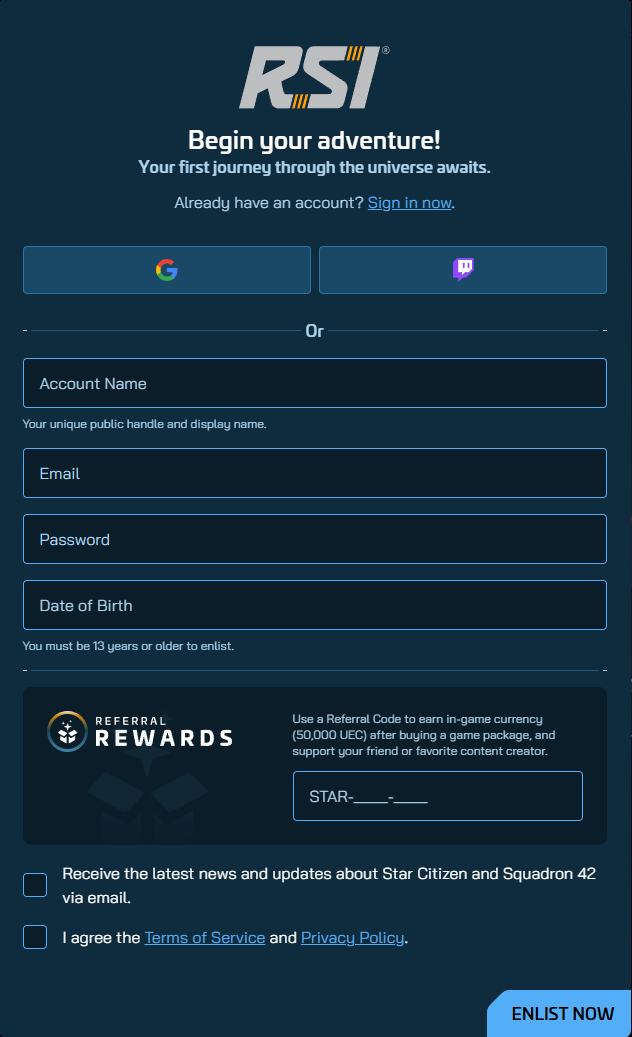
The Referral Rewards field on RSI's signup page sits below the account details and just above the Terms checkbox. People miss it because the layout puts it at the bottom. This page shows the field, walks through the four taps that earn you 50,000 UEC, and covers the two recovery paths if you missed it the first time.
What the field actually looks like
Before the steps, here is the form so you know what you're looking for. The full signup page is on the left; the close-up on the right is the only block that matters for the bonus.

STAR-JTV7-FXLR here.The signup, in four steps
-
Open the RSI signup page
The orange button above pre-fills the code into the URL, that's the fastest path. If you got here from somewhere else, go to
robertsspaceindustries.com/enlistdirectly; you'll paste the code yourself in step 3. -
Fill in Account Name, Email, Password and Date of Birth
Account Name is your public handle, it shows up on your RSI profile and in-game; you can change it once for free later. Email and Password should be unique to RSI (not reused). Date of Birth has to be 13+; RSI will block younger ages at submission.
-
Scroll down to Referral Rewards and paste the referral code
The field accepts the format
STAR-XXXX-XXXX, keep the dashes. If you used the orange button above, the value is already there; double-check it reads exactlythe referral codewith no trailing spaces. Tick the Terms checkbox, then click Enlist Now at the bottom right. -
Buy a Game Package of $40 USD or more
The 50,000 UEC only credits once a qualifying Game Package is on your account. The cheapest is the Citizen Starter Pack at $45 (promotional, $60 base; RSI Aurora Mk II + 10,000 UEC of its own, the referral bonus stacks on top). After the purchase, the new UEC balance appears on your account dashboard within a few minutes.
Quick sanity-check before you click Enlist
If you copied the code from somewhere with rich formatting (a chat app, an email), there can be invisible spaces or zero-width characters around it. Easiest tell: the code looks fine on screen but the field rejects it. Re-type it by hand once, the referral code, and the rejection goes away.
Already enlisted without the code? You have 24 hours.
If you created the account before finding this page, the Referral Rewards block is still inside your account settings, but only for exactly 24 hours from account creation. After that the field disappears and RSI support does not manually re-open it. The clock starts the moment you click Enlist Now, not when you complete a purchase. RSI referral conditions
-
Sign in at
robertsspaceindustries.comUse the account you just made.
-
Open the account menu (top right) and find Referral Rewards
It is the same block from the signup screenshot above, now embedded inside your account dashboard.
-
Paste the referral code and confirm
The code locks to your account. When you complete a Game Package, the 50,000 UEC arrives automatically.
The $40 rule almost nobody mentions
RSI advertises the 50,000 UEC signup bonus after buying a Game Package. For the referrer to earn a Recruitment Point, the account must own a Game Package and reach $40 USD in eligible fresh-money spending across the pledge store. Store credit and gifted pledges do not count toward that spend.
Watch out for under-$40 bundles
The standard referral reward is 50,000 account UEC for a new account registered with a valid code. Game access requires a Game Package outside public trials. The separate $40 USD fresh-money spending rule determines the referrer’s Recruitment Point, not a different signup bonus. Alpha aUEC crediting can be delayed when a code is added later.
Add a valid referral code during registration or within 24 hours on a new account without one. Buying a package is not required within that code-entry window. The standard reward is account UEC; alpha aUEC availability and crediting depend on RSI rules and the current build. The referrer’s $40 eligible spending requirement is separate.
How to verify the 50,000 UEC actually arrived
RSI does not send a celebratory email when the bonus credits. You verify it by hand, and it's a five-second check:
- Sign in at
robertsspaceindustries.comUse the account you used for the Game Package purchase.
- Open your account dashboard
You should see a UEC balance line on the account summary. If the referral bonus credited, the number is at least 50,000 UEC (more if your Game Package included its own UEC, the Citizen Starter Pack adds 10,000 UEC of its own, so the line reads at least 60,000 UEC).
- If the balance is short, open Referral Rewards inside the account menu
The page will show whether your account is tied to a referral code and whether it has qualified. If it shows the code attached but the bonus pending, give it a couple of hours, peak windows like IAE in November can slow this down.
When the code is rejected, three real causes
| What you see | Likely cause | Fix |
|---|---|---|
| "Invalid code" or the field shakes red on submit | Format mismatch, usually invisible whitespace pasted from an app, or a missing dash | Re-type the code by hand: STAR-JTV7-FXLR. Don't copy-paste from chat clients. |
| The Referral Rewards block isn't there at all | Your account is older than 24 hours, or you are signed in to a pre-existing account | Codes apply only to new accounts within 24 hours of creation. Existing accounts can't redeem. |
| Code accepted at signup but 50,000 UEC never showed | Game Package on file is under $40 USD, or purchase hasn't cleared yet | Check the package price excluding any region tax, if it's under $40 the bonus doesn't trigger. |
A note about which code you use
The 50,000 UEC bonus is paid by RSI, not by the code holder. That means any working referral code on the planet credits the same amount on your end. The thing that varies between codes is whether someone is keeping theirs maintained, a randomized code pulled from a rotating pool can quietly break without warning when the underlying account hits a tier ceiling or goes inactive.
This site keeps one code, the referral code, and links to the current official rules. Honest disclosure: when you use it I earn one Recruitment Point on the RSI ladder. You get the full 50,000 UEC either way; you pay the same price for your Game Package whether you use a code or not.
Related pages on this site
For balances and resets, read RSI’s currency explanation. Package UEC, account UEC and temporary alpha aUEC are different balances.